When you need to automatically generate and send license keys to customers via API, you can configure API call parameters for your products. This article details the various parameters and signature verification mechanism for API configuration.
Enable API Mode
First, you need to switch the key type from "Key" to "API" on the product edit page. After saving, click "API Management" for that product in the inventory list to enter the configuration page.
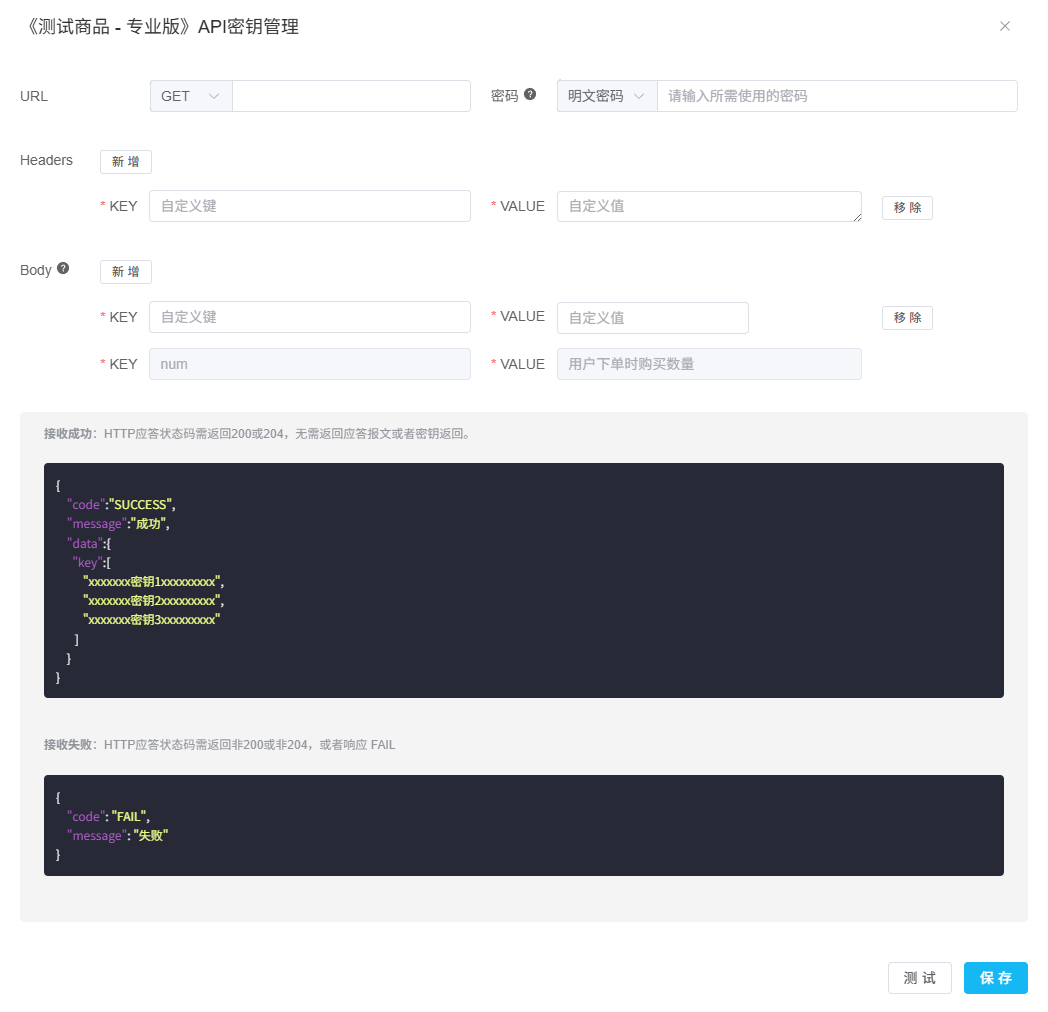
Basic Configuration
| Parameter | Description |
|---|---|
| URL | API request URL, supports GET or POST methods |
| Password Verification | Choose between "Plain Password" or "Signature Key" verification methods |
Signature Verification Mechanism
Using signature keys ensures the security and integrity of requests. Keys are stored only on the server side and are not exposed during network transmission.
Signature Calculation Steps
-
Construct Signature StringConcatenate current timestamp (milliseconds) +
\n+ secret key into a signature string -
Calculate HMAC-SHA256Use HmacSHA256 algorithm to calculate the signature string
-
Base64 EncodeBase64 encode the calculation result
-
URL EncodeURL encode the Base64 result (using UTF-8 charset) to get the final signature
PHP Example Code
<?php
// Get 13-digit millisecond timestamp
list($msec, $sec) = explode(' ', microtime());
$msectime = (float)sprintf('%.0f', (floatval($msec) + floatval($sec)) * 1000);

// Signature key
$secret = "your_secret_key";

// Construct signature string
$str = "{$msectime}\n{$secret}";

// Calculate HMAC-SHA256 (raw binary data)
$hmacSha256 = hash_hmac('sha256', $str, $secret, true);

// Base64 encode then URL encode
$signature = urlencode(base64_encode($hmacSha256));

var_dump($signature);
Request Headers
API requests will include the following Headers information:
| Header | Value | Description |
|---|---|---|
Content-Type |
application/json | Default content type |
User-Agent |
apsdai-hook | Fixed value to identify requests from APSDAI |
X-Apsdai-Token |
password / sign | Plain password or calculated signature |
X-Apsdai-Timestamp |
1576754827988 | Timestamp when API request was triggered (milliseconds) |
Custom Parameters
Custom Headers
Click "Add" to add custom Headers, fill in KEY and VALUE.
Custom Body
Body parameter VALUES can come from data collected in inventory information. Click "Add" and fill in KEY and VALUE.
Response Format
{
  "code": "SUCCESS",
  "message": "Success",
  "data": {
    "key": [
      "xxxxxxxLicenseKey1xxxxxxxxx",
      "xxxxxxxLicenseKey2xxxxxxxxx",
      "xxxxxxxLicenseKey3xxxxxxxxx"
    ]
  }
}
{
  "code": "FAIL",
  "message": "Failure reason"
}
Failure: HTTP status code returns non-200/204, or response code is FAIL.