After selecting a warehouse for your product, once the product is created, a "Key Management" entry will appear in the warehouse list. Click to add license key inventory for the product.
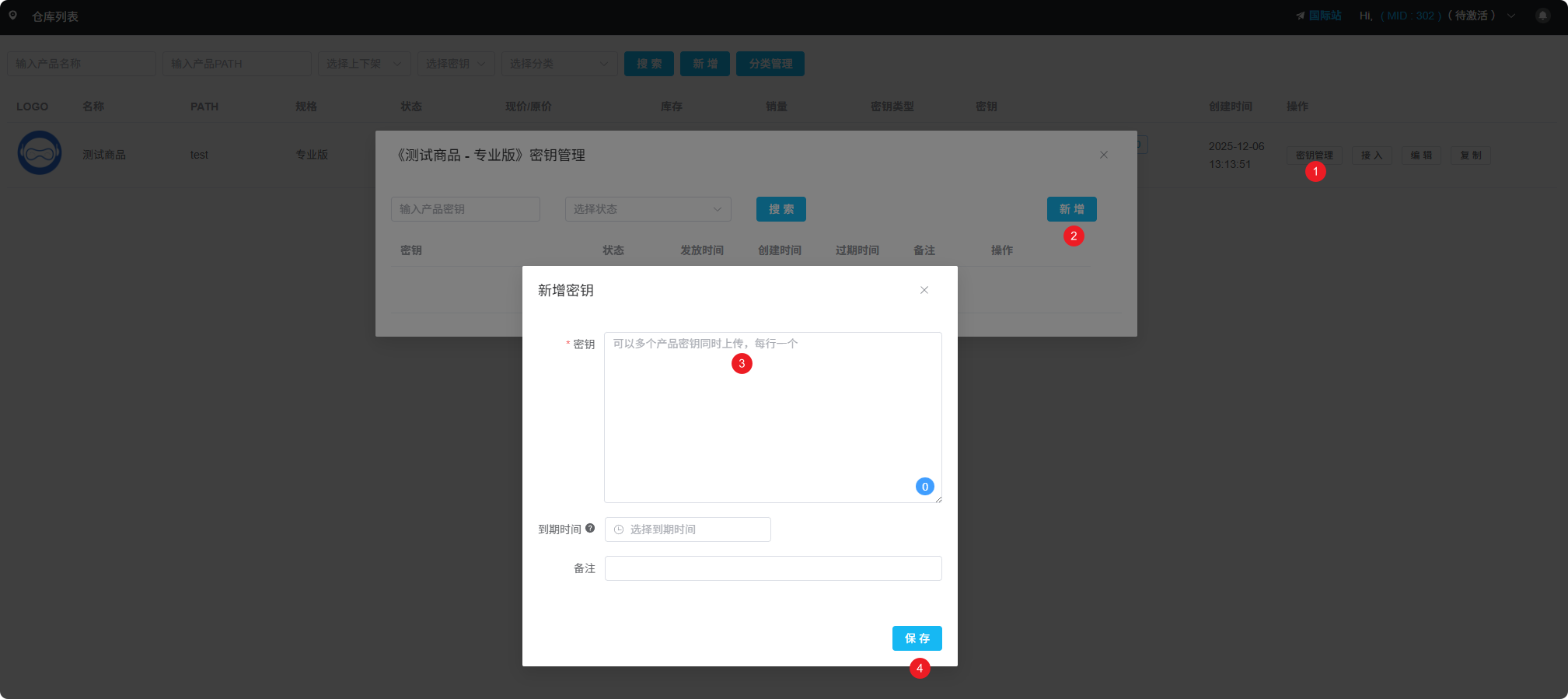
Key Management Entry
Key Types
APSDAI system supports two key management methods:
Manual Addition
Manually add keys to the warehouse, new orders automatically retrieve keys from warehouse for delivery
API Auto-Generation
Configure API interface, automatically get user info and call API to generate keys when new orders are placed
Manual Key Addition
Suitable for scenarios with existing fixed key inventory:
- Go to the product's "Key Management" page
- Click the "Add Keys" button
- Batch paste or enter keys one by one
- After saving, keys are ready for automatic delivery
Batch Import
Supports batch pasting of keys, one key per line. The system will automatically identify and add them to the warehouse.
API Auto-Generation
Suitable for scenarios requiring dynamic key generation based on user information:
- Configure your API endpoint address
- Set request parameters and signature method
- When new orders are placed, the system automatically calls the API to get keys
- Keys are automatically sent to users
API Configuration
For detailed API configuration methods, please refer to the Payment API documentation.